
Too Many Redirects on xxx.com After Enabling Cloudflare CDN
This post was translated from Chinese by AI. If anything reads oddly, the Chinese original is authoritative. 中文原文
Why isn't my site running over HTTPS?
If you recently signed up for Cloudflare and the certificate status above shows “Authorizing Certificate,” your site cannot use HTTPS yet because Cloudflare does not have a certificate for it. Setup usually takes around 15 minutes on paid plans and up to 24 hours on the Free plan. If you still do not have a certificate after that, contact support.
If the status above shows “Active Certificate,” several other common issues may occur when accessing your site over HTTPS.
Which SSL setting should I use?
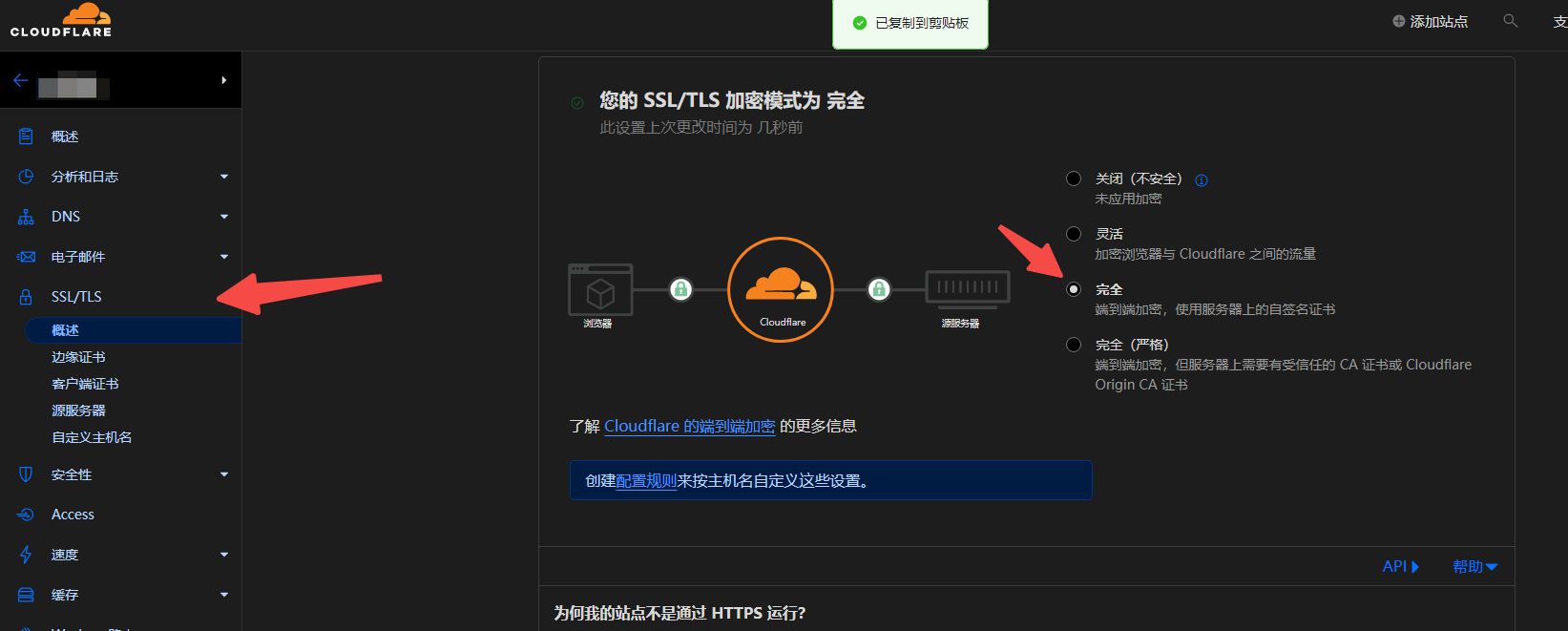
This setting controls how Cloudflare's servers connect to your origin server for HTTPS requests. We recommend enabling “Full SSL (strict)” whenever possible. Common use cases for each setting:
- Off: Visitors cannot view your site over HTTPS; they will be redirected to HTTP.
- Flexible SSL: You cannot configure HTTPS support on your origin server, even with a certificate that is not valid for your site. Visitors can access your site over HTTPS, but the connection to your origin server uses HTTP. Note: Some origin server configurations may cause redirect loops.
- Full SSL: Your origin server supports HTTPS, but the installed certificate does not match your domain or is self-signed. Cloudflare connects to your origin server over HTTPS but does not validate the certificate.
- Full (strict): Your origin server has a valid certificate installed (not expired and signed by a trusted CA or Cloudflare Origin CA). Cloudflare connects over HTTPS and validates the certificate for every request.
So, choose the third or fourth option, then wait a little for the setting to take effect
Last updated 2024-01-14
Comments 0