
BT Panel Linux Toolbox
This post was translated from Chinese by AI. If anything reads oddly, the Chinese original is authoritative. 中文原文
Commands
wget -O btpanel_tools.sh https://download.btpanel.cm/tools/btpanel_tools.sh && bash btpanel_tools.sh
Or
wget -O btpanel_tools.sh https://raw.githubusercontent.com/gacjie/btpanel_tools/main/btpanel_tools.sh && bash btpanel_tools.sh
Brief Introduction
The BT Panel Linux Toolbox is a script-based management tool primarily for Linux systems, with compatibility adjustments for all Linux distributions. It covers common Linux administration tasks, including one-click BT Panel template changes, removal of mandatory login, one-click panel repair, cleanup of system junk and caches, and system optimization.
Screenshot
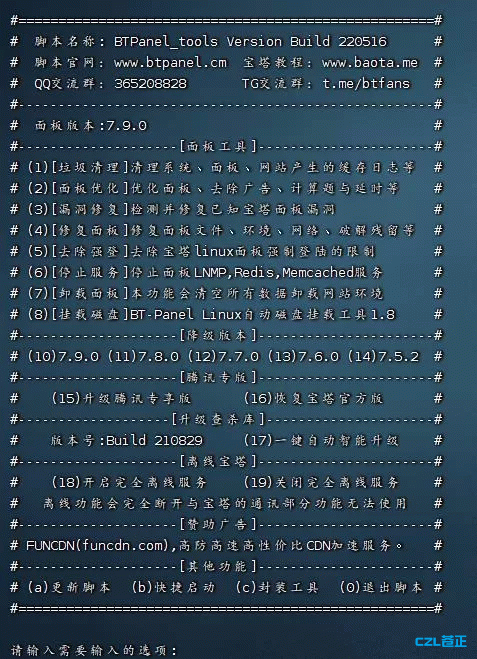
{card-default label="Feature Overview"}
()Junk cleanup[Remove cache and log files generated by the system, panel, and websites; use with caution]
()System optimization[Optimize selected system settings; currently only supports centos7.X]
()Login restrictions[Remove mandatory login from BT Panel for Linux]
()Stop services[Stop the panel's LNMP,Redis,Memcached services]
()Repair panel[Clean up cracked versions, repair the panel environment, and update to the latest official version]
()Repair environment[Install or upgrade BT Panel's lnmp environment; only supports centos7]
()Mount disks[Official one-click automatic mounting tool]
()Switch repositories[Currently only supports switching centos7 yum repositories]
()Panel customization[Make the panel home page display a permanent Enterprise edition license]
()Downgrade panel[Supports downgrading to previous versions]
()Plugin optimization[Currently supports updating the malware signature databases for all security plugins]
()Take panel offline[Block BT Panel's communication endpoints; this affects panel plugin installation and upgrades]
()Uninstall panel[Replaced with the official uninstall script; supports removing only the panel while keeping the environment; use caution when removing the environment ]
()Version check[Check whether your installed panel is a pirated version ]
{/card-default}
{card-default label="Changelog"}
May 16, 2022
Removed pointless features such as pirated-version detection
Improved panel optimization by adding an option to disable forced upgrades
Added an option to remove arithmetic challenges
Added compatibility with Rainbow's one-click optimization feature
April 1, 2022
Attempted to support all linux distributions
Improved junk cleanup: website logs now require confirmation before deletion
Improved login restriction removal: added a version check to determine whether the panel needs to be downgraded
Merged ad removal, arithmetic challenge removal, blacklist repair, and Rainbow's one-click optimization into the panel optimization feature
Added BT Panel network connectivity checks and blacklist repair to the panel repair feature
Added upgrade recovery for the Tencent Cloud exclusive edition
Reduced wget commands to run locally wherever possible
Added vulnerability fixes to attempt to patch known vulnerabilities
Some removed features will be moved to the Linux_Tools script
February 16, 2022
Removed userinfo configuration file generation and added blacklist prevention to the panel repair feature. Added blacklist repair, which repairs the panel and removes blacklist restrictions (cracked-version warnings). January 9, 2022
Updated login verification removal to use a secondary account's configuration file.
December 22, 2021
Login verification removal now supports stable version 7.8.0
Since BT Panel has rolled out the new version to only a small number of users
the script now supports upgrading to stable version 7.8.0
There may be many BUGs; upgrading production environments before the official rollout is not recommended.
December 10, 2021
BT Panel linux7.8.27 added account unlinking, which automatically deletes the configuration file. Fetching the list requires this file for decryption, so removing login restrictions will no longer be supported going forward
Added more file unlocking and configuration file recovery options to panel repair. Added options and prompts to the login restriction feature; use them as needed.
November 21, 2021
Added a new feature (certificate updates) to update system root certificates and resolve certificate-related issues
This update integrates the CA certificate bundle extracted from Mozillahttps://curl.se/docs/caextract.html
For example: when configuring smtp, sending over port 465 fails even though it works on other servers
November 08, 2021
()Login restrictions[Since the new version checks the user file, added random generation of user login configuration files]
()Arithmetic verification[Integrated Rainbow Blog's feature for removing various arithmetic challenges and wait delays from BT Panel for Linux]
September 7, 2021
()Quick launch[Added a feature to install this tool into the system so it can be launched quickly with the btt command]
September 3, 2021
()Downgrade panel[Fixed a 404 error that prevented this feature from working]
August 29, 2021
()Take panel offline[Added blocking for api.bt.cn and cracked-version domains]
()System optimization[New feature; currently only supports centos7]
()Version check[New feature; checks whether your installed panel is a pirated version ]
()Script updates[Changed script update checks to be triggered manually]
()Panel customization[Removed this set of features]
()Plugin optimization[Changed signature database updates to one-click smart updates]
()BT Panel partnership[Removed this set of features]
{/card-default}
Disclaimer
- I promise not to compromise users' interests; no Trojans or backdoors;
- This is a free, open-source script, and users are welcome to review its contents;
- Back up your data. Issues may arise due to differences between environments. You can contact me for help, but I cannot guarantee a solution!
Last updated 2024-01-14
Comments 0