
[Hands-On Guide] Fixing Inaccessible Ports on Oracle Cloud After Configuring Security Groups
This post was translated from Chinese by AI. If anything reads oddly, the Chinese original is authoritative. 中文原文
* [https://www.bilibili.com/read/cv12750106/](https://www.bilibili.com/read/cv12750106/)
* 甲骨文云(Oracle Cloud)是甲骨文公司提供的云计算服务,甲骨文公司管理的数据中心通过全球网络向用户提供服务器、存储、网络、应用和服务。维基百科前段时间甲骨文云一直很火,原因是它推出了一个Always Free 云服务确实划算然而我在注册领取服务器后,碰到了一个问题,在设置安全组之后,仍然无法访问该端口,最终问了客服才解决,所以我就把客服给我的教程写下来了~作者采用了位于Australia East (Sydney)的服务器,映像为: Canonical-Ubuntu-20.04-202
* 2024-04-02 18:57:17
Oracle Cloud is a cloud computing service provided by Oracle Corporation. Oracle-managed data centers deliver servers, storage, networking, applications, and services to users through a global network.
Wikipedia
Oracle Cloud was getting a lot of attention recently because it launched an Always Free cloud service
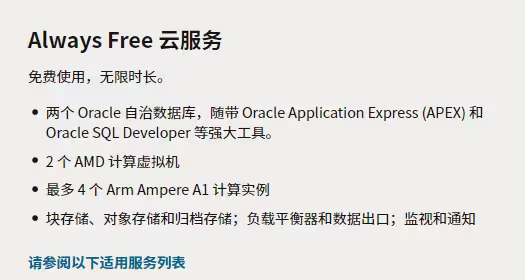
It really is a good deal
However, after signing up and provisioning a server, I ran into a problem: even after configuring the security group, I still couldn't access the port. I finally resolved it by contacting support, so I'm writing down the instructions they gave me~
I used a server in Australia East (Sydney) with the image: Canonical-Ubuntu-20.04-2021.07.20-0. This tutorial may not apply to your server!!!
1.Open the security group
First, follow the usual process to allow traffic in the security group. Find Primary VNIC-Subnet:XXXX

Then find the security list and click it

You'll see egress rules and ingress rules. Adjust them as needed. (Egress usually allows all traffic; adjust ingress as needed.)


Example of an egress rule allowing all traffic
Normally, this should be enough, but for some reason my server was still inaccessible. Here's the fix😀~
2.Install a firewall?
I'm not sure why this is necessary either. Maybe this Ubuntu image blocks all ports by default, and you need to install a firewall yourself to open them... I guess
The steps are simple. Just log in via SSH and run
sudo apt install firewalld
sudo firewall-cmd --zone=public --permanent --add-port=端口/协议
sudo firewall-cmd --reload
Replace 端口 with the port you want to allow, and 协议 with udp, tcp, or another protocol, as needed.
Comments 0