
random-api-go: Go Rewrite
This post was translated from Chinese by AI. If anything reads oddly, the Chinese original is authoritative. 中文原文
Latest updates at: https://q58.club/t/topic/127?u=wood
Repository
https://github.com/woodchen-ink/random-api-go
Demo and API URL
Background
The original nodejs and worker versions: https://q58.club/t/topic/20
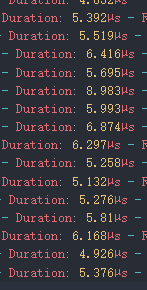
I rewrote this in go to address performance and concurrency issues. After the rewrite, each request typically takes 5 microseconds to process, with memory usage as low as 4M.

Features
- Dynamic loading and caching of CSV file contents
- Random image and video serving
- Customizable URL path configuration
- Docker support for easy deployment and scaling
- Detailed logging
Deployment
docker compose:
https://github.com/woodchen-ink/random-api-go/blob/main/docker-compose.yml
Notes:
- The public directory holds files such as
index.html,index.md, andcss. When the container is first created, these files are automatically copied from the project. Modify them as needed. - The data directory holds
server.logandstats.json, which contain logs and statistics, respectively. BASE_URLis the base URL for requesting the csv files listed inurl.json. It automatically handles https and supports paths.
Detailed Steps
-
Create a csv file containing image URLs, one per line, such as
ecy.csv, and make it accessible athttps://file.example.com/random/pic/ecy.csv; The CSV file should contain one URL per line. For example:https://example.com/image1.jpg https://example.com/image2.jpg https://example.com/image3.jpg -
Create your url.json and make it accessible at
https://file.example.com/random/url.json, for example:{ "pic": { "ecy": "pic/ecy.csv" } }If you use a different prefix instead of
pic, you need to add it at the following location in the code, following the example.
-
Deploy with docker using this docker-compose.yml:
services: random-api-go: container_name: random-api-go image: woodchen/random-api-go:latest ports: - "5003:5003" volumes: - ./public:/root/public - ./data:/root/data environment: - TZ=Asia/Shanghai - BASE_URL=https://file.example.com/random restart: unless-stopped -
Configure nginx as a reverse proxy for port 5003. Example configuration:
location ^~ / { proxy_pass http://127.0.0.1:5003; proxy_set_header Host $host; proxy_set_header X-Real-IP $remote_addr; proxy_set_header X-Forwarded-For $proxy_add_x_forwarded_for; proxy_set_header REMOTE-HOST $remote_addr; proxy_set_header Upgrade $http_upgrade; proxy_set_header Connection "upgrade"; proxy_set_header X-Forwarded-Proto $scheme; proxy_http_version 1.1; add_header X-Cache $upstream_cache_status; add_header Cache-Control no-cache; proxy_ssl_server_name off; add_header Strict-Transport-Security "max-age=31536000"; } -
Visiting
域名/pic/ecyreturns a 302 redirect to an image URL. -
Visiting
域名displays the home page. Customize its content inpublic/index.htmlandpublic/index.md.
Notes
- The current version no longer periodically clears the csv cache and fetches the files again, as this is unnecessary and slows things down. Restart the container after modifying the files to fetch them again;
- If you run into problems, check the container logs. They are detailed and written in Chinese;
- If you do not want to host static files separately, place
url.jsonandpic/ecy.csvin the public directory and leaveBASE_URLunset. In this case, requests use the domain serving the current project, meaning they will requesthttps://random.com/url.jsonandhttps://random.com/pic/ecy.csv; - Leave a comment if you have any other questions.
Example url.json with multiple paths:
{
  "pic": {
    "all": "url/pic/all.csv",
    "fj": "url/pic/fj.csv",
    "czlwb": "url/pic/czl-website-background.csv",
    "truegirl": "url/pic/truegirl.csv",
    "truegirl1": "url/pic/truegirl1.csv",
    "truegirl2": "url/pic/truegirl2.csv",
    "girl-gif": "url/pic/girl-gif.csv",
    "ecy": "url/pic/ecy.csv",
    "ecy1": "url/pic/ecy1.csv",
    "ecy2": "url/pic/ecy2.csv",
    "ai": "url/pic/ai.csv",
    "loading": "url/pic/loading.csv"
  },
  "video": {
    "all": "url/video/all.csv"
  }
}
Last updated 2025-02-15
Comments 0