
Got Access to Azure OpenAI but Not Sure How to Call the API? Use Cloudflare or docker
This post was translated from Chinese by AI. If anything reads oddly, the Chinese original is authoritative. 中文原文
I've released a new open-source proxy implemented with Node.js: https://github.com/woodchen-ink/azure-to-openai-adapter
You can use this open-source project on Github to adapt the API, allowing open-source projects that call the standard openai API to work normally
Project URL: https://github.com/haibbo/cf-openai-azure-proxy
The project also supports docker deployment. You can find the details on github; this post only covers the cloudflare method.
Create a new worker service on Cloudflare, deploy it quickly, then edit the code
// The name of your Azure OpenAI Resource.
const resourceName='test0'
// This is the name of the OPENAI resource in your Azure account. If you're unsure, see the screenshot below.

// The deployment name you chose when you deployed the model.
const mapper = {
    'gpt-3.5-turbo': 'test0',
    //The value on the right is the deployment name of your 3.5 model. If you're unsure, see the screenshot below.
    'gpt-4': 'test1'
    //The value on the right is the deployment name of your 4 model. If you're unsure, see the screenshot below.
};

const apiVersion="2023-03-15-preview"

addEventListener("fetch", (event) => {
  event.respondWith(handleRequest(event.request));
});

async function handleRequest(request) {
  if (request.method === 'OPTIONS') {
    return handleOPTIONS(request)
  }

  const url = new URL(request.url);
  if (url.pathname === '/v1/chat/completions') {
    var path="chat/completions"
  } else if (url.pathname === '/v1/completions') {
    var path="completions"
  } else if (url.pathname === '/v1/models') {
    return handleModels(request)
  } else {
    return new Response('404 Not Found', { status: 404 })
  }

  let body;
  if (request.method === 'POST') {
    body = await request.json();
  }

  const modelName = body?.model;
  const deployName = mapper[modelName] || ''

  if (deployName === '') {
    return new Response('Missing model mapper', {
        status: 403
    });
  }
  const fetchAPI = `https://${resourceName}.openai.azure.com/openai/deployments/${deployName}/${path}?api-version=${apiVersion}`

  const authKey = request.headers.get('Authorization');
  if (!authKey) {
    return new Response("Not allowed", {
      status: 403
    });
  }

  const payload = {
    method: request.method,
    headers: {
      "Content-Type": "application/json",
      "api-key": authKey.replace('Bearer ', ''),
    },
    body: typeof body === 'object' ? JSON.stringify(body) : '{}',
  };

  let response = await fetch(fetchAPI, payload);
  response = new Response(response.body, response);
  response.headers.set("Access-Control-Allow-Origin", "*");

  if (body?.stream != true){
    return response
  }

  let { readable, writable } = new TransformStream()
  stream(response.body, writable);
  return new Response(readable, response);

}

function sleep(ms) {
  return new Promise(resolve => setTimeout(resolve, ms));
}

// support printer mode and add newline
async function stream(readable, writable) {
  const reader = readable.getReader();
  const writer = writable.getWriter();

  // const decoder = new TextDecoder();
  const encoder = new TextEncoder();
  const decoder = new TextDecoder();
// let decodedValue = decoder.decode(value);
  const newline = "\n";
  const delimiter = "\n\n"
  const encodedNewline = encoder.encode(newline);

  let buffer = "";
  while (true) {
    let { value, done } = await reader.read();
    if (done) {
      break;
    }
    buffer += decoder.decode(value, { stream: true }); // stream: true is important here,fix the bug of incomplete line
    let lines = buffer.split(delimiter);

    // Loop through all but the last line, which may be incomplete.
    for (let i = 0; i < lines.length - 1; i++) {
      await writer.write(encoder.encode(lines[i] + delimiter));
      await sleep(30);
    }

    buffer = lines[lines.length - 1];
  }

  if (buffer) {
    await writer.write(encoder.encode(buffer));
  }
  await writer.write(encodedNewline)
  await writer.close();
}

async function handleModels(request) {
  const data = {
    "object": "list",
    "data": []
  };

  for (let key in mapper) {
    data.data.push({
      "id": key,
      "object": "model",
      "created": 1677610602,
      "owned_by": "openai",
      "permission": [{
        "id": "modelperm-M56FXnG1AsIr3SXq8BYPvXJA",
        "object": "model_permission",
        "created": 1679602088,
        "allow_create_engine": false,
        "allow_sampling": true,
        "allow_logprobs": true,
        "allow_search_indices": false,
        "allow_view": true,
        "allow_fine_tuning": false,
        "organization": "*",
        "group": null,
        "is_blocking": false
      }],
      "root": key,
      "parent": null
    });
  }

  const json = JSON.stringify(data, null, 2);
  return new Response(json, {
    headers: { 'Content-Type': 'application/json' },
  });
}

async function handleOPTIONS(request) {
    return new Response(null, {
      headers: {
        'Access-Control-Allow-Origin': '*',
        'Access-Control-Allow-Methods': '*',
        'Access-Control-Allow-Headers': '*'
      }
    })
}
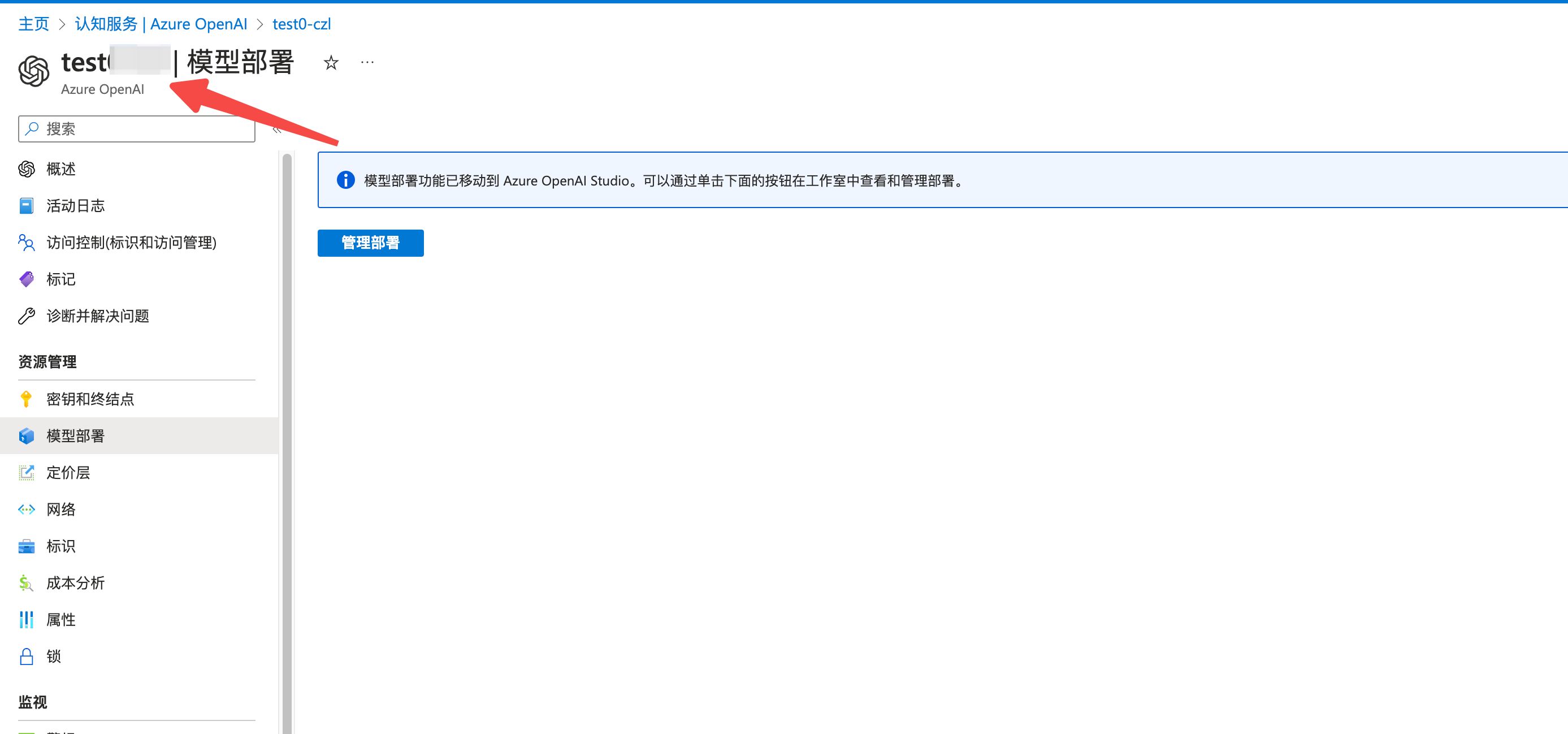
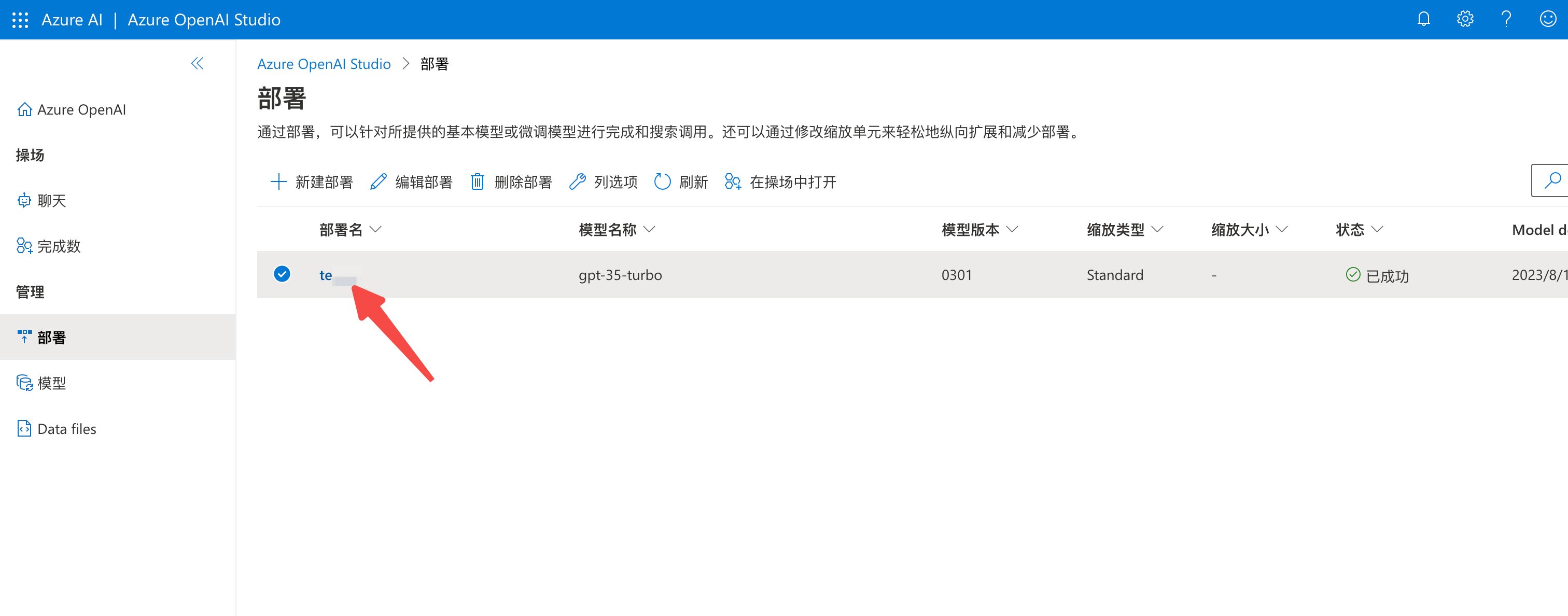
Fill in the code and deploy the service, then use it with most open-source projects. Set the proxy URL to your cloudflare worker URL and the key to your azure API key.
For a quick test, trymy open-source single-page project
Last updated 2025-06-25
Comments 0