
Change Your Computer's Font
This post was translated from Chinese by AI. If anything reads oddly, the Chinese original is authoritative. 中文原文
- Navigate to the following registry path:
HKEY_LOCAL_MACHINE\SOFTWARE\Microsoft\Windows NT\CurrentVersion\Fonts. - Then find
“Microsoft YaHei & Microsoft YaHei UI (TrueType)”, right-click it, select Modify, and change it to “simsun.ttc” (enter the font's English short name here; you can choose your own font).
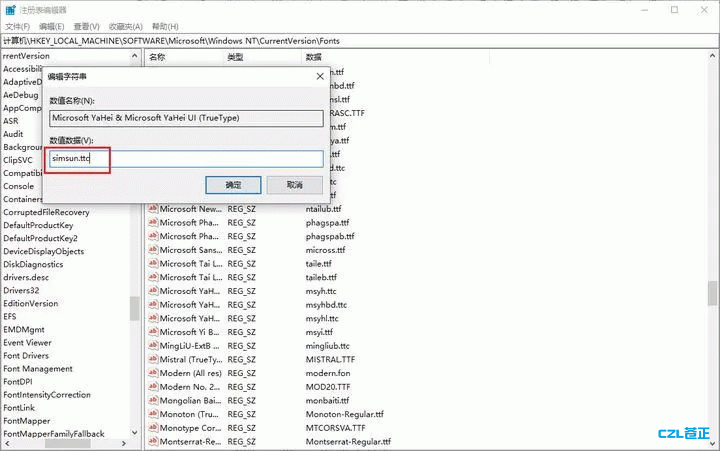
- Next, navigate to the following registry path:
HKEY_LOCAL_MACHINE\SOFTWARE\Microsoft\Windows NT\CurrentVersion\FontSubstitutes.
Right-click an empty area, create new string values named 【Microsoft YaHei and Microsoft YaHei UI】, and set their values to “SimSun”.
Last updated 2024-01-14
Comments 0