
Set Up Persistent URL Rewrites in Synology NAS webstation
This post was translated from Chinese by AI. If anything reads oddly, the Chinese original is authoritative. 中文原文
Directly editing Synology's default nginx index file does not persist after a restart. Here's a way to make a website's URL rewrite rules permanent.
Steps
1. Log in to the NAS via SSH, then obtain root privileges

2. Find the website's configuration directory
Check the website ID in Synology's /var/tmp/nginx/app.d/server.webstation-vhost.conf, as highlighted in red below
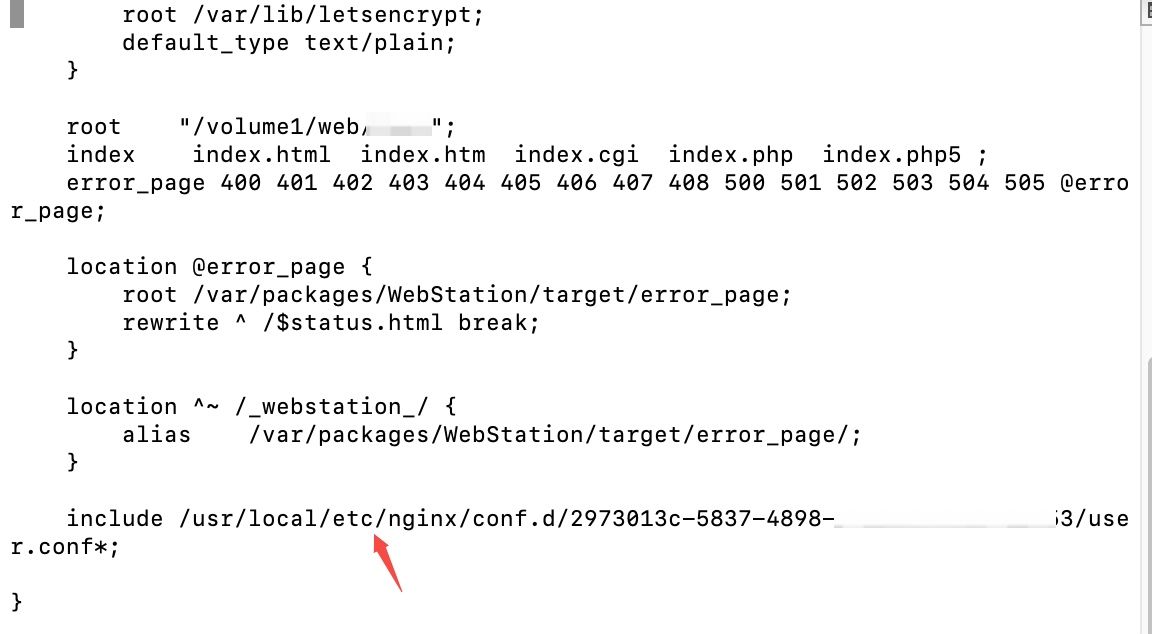
Command:
vi /var/tmp/nginx/app.d/server.webstation-vhost.conf
3.Open the configuration file in the directory
Go to the directory highlighted in red above, create a user.conf configuration file, paste in the rewrite rules, and save it to make them permanent.
Command:
vi /usr/local/etc/nginx/conf.d/ba35bf8c-0072-48c0-9c70-xxxxxxxxx/user.conf
4. Reload nginx
nginx -s reload
An easier method
We can include our own custom configuration file in a file such as /usr/local/etc/nginx/conf.d/ba35bf8c-0072-48c0-9c70-xxxxxxxxx/user.conf to make editing easier. For example, add this to user.conf:
include /volume1/web/example/example.conf;
Then we can simply edit the example.conf file directly.
Last updated 2025-06-25
Comments 0