
Worktrunk: A Wrapper for git worktree That Keeps Parallel AI Agents from Clashing over Files
This post was translated from Chinese by AI. If anything reads oddly, the Chinese original is authoritative. 中文原文
When you run five or six Claude Code or Codex sessions at once, the first problem you hit is that they all edit files in the same directory and step on each other’s toes. Git’s built-in worktree feature is designed for this: each task gets its own working directory, while sharing the same repository history. But the native commands are verbose, so Worktrunk wraps them in a more convenient interface. According to its author, it is already the most popular git worktree management tool, gaining more than 50 stars today alone. Demand for this kind of “parallel multi-agent” workflow is clearly growing.
What it solves
Creating a new branch with native worktree commands means typing the branch name three times: git worktree add -b feat ../repo.feat, then cd ../repo.feat. When you’re done, you also have to remove the directory and branch manually.
Worktrunk’s approach is to make worktrees as easy to use as branches: address them by branch name, and let a template calculate the path automatically instead of assembling it yourself.
| Task | Worktrunk | Native git |
|---|---|---|
| Switch | wt switch feat |
cd ../repo.feat |
| Create and launch Claude | wt switch -c -x claude feat |
git worktree add -b feat ../repo.feat && cd ../repo.feat && claude |
| Clean up | wt remove |
git worktree remove ../repo.feat && git branch -d feat |
| List with status | wt list |
git worktree list (paths only) |
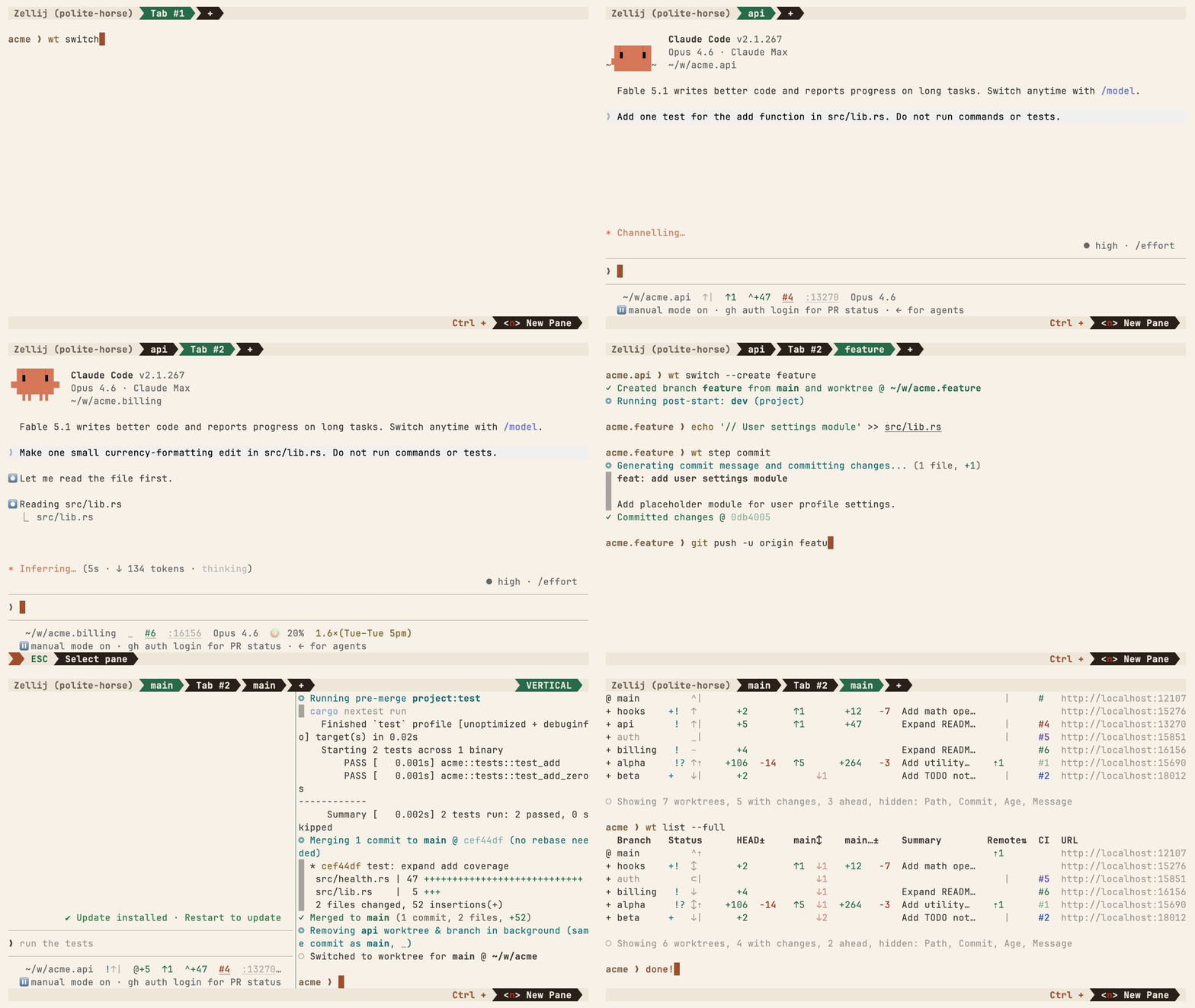
Core features
Beyond the three basic commands, several features really save time in multi-agent workflows:
- Hooks: Run custom commands at stages such as creation, before merging, and after merging—for example, automatically install dependencies after creating a worktree
- Shared build caches:
wt step copy-ignoredlets ten worktrees share directories such astarget/andnode_modules/, without rebuilding or copying them for each one (requires a copy-on-write filesystem such as APFS, btrfs, or XFS) - Merge with one command: Squash, rebase, merge, and clean up in one go
- LLM-generated commit messages: Generate commit messages from the diff
wt list --full: Show CI status and an AI-generated summary for each branch, so you can see each agent’s progress at a glance- Switch directly to a PR:
wt switch pr:123jumps to the branch for a specific PR - A development port for each worktree: The template’s
hash_portfilter calculates a stable, non-conflicting port for each worktree, so multiple dev servers can run without clashes - Interactive picker: Stream CI status and preview diffs, logs, PRs, and comments
- Aliases and per-branch variables: Define custom
wt <名字>commands
Installation
macOS / Linux:
brew install worktrunk && wt config shell install
Or use Cargo:
cargo install worktrunk && wt config shell install
Arch Linux has pacman -S worktrunk, and community packages are also available for conda.
Windows users should watch out for one gotcha: wt conflicts with the Windows Terminal command, so the Winget version also installs as git-wt:
winget install max-sixty.worktrunk
git-wt config shell install
You can also disable Windows Terminal’s app execution alias in system settings and use wt directly.
Don’t skip wt config shell install: it installs the shell integration that wt switch needs to actually change your directory.
Who it’s for, and things to watch out for
- If you regularly run multiple Claude Code or Codex sessions at once, this tool is basically made for you
- Even without AI agents, it’s useful if you often switch between branches and don’t want to stash
- Shared build caches depend on filesystem copy-on-write support, so older filesystems such as ext4 miss out
- The project is still evolving rapidly. The latest version is v0.80.0 (released on 2026-09-27), it hasn’t reached 1.0 yet, and command details may continue to change
- You can choose either the MIT or Apache-2.0 license
Project information
- Language: Rust
- License: MIT OR Apache-2.0
- Star: Approximately 8,600 as of 2026-10-01
- GitHub:https://github.com/max-sixty/worktrunk
- Documentation: https://worktrunk.dev
Originally published on the SunAI forum. Versions, star counts, and relative times in this article reflect the original post’s publication date.
Last updated 2026-10-09
Comments 0