
DBX: A 25 MB Database Client for Over 100 Database Types, with MCP for AI Agents
This post was translated from Chinese by AI. If anything reads oddly, the Chinese original is authoritative. 中文原文
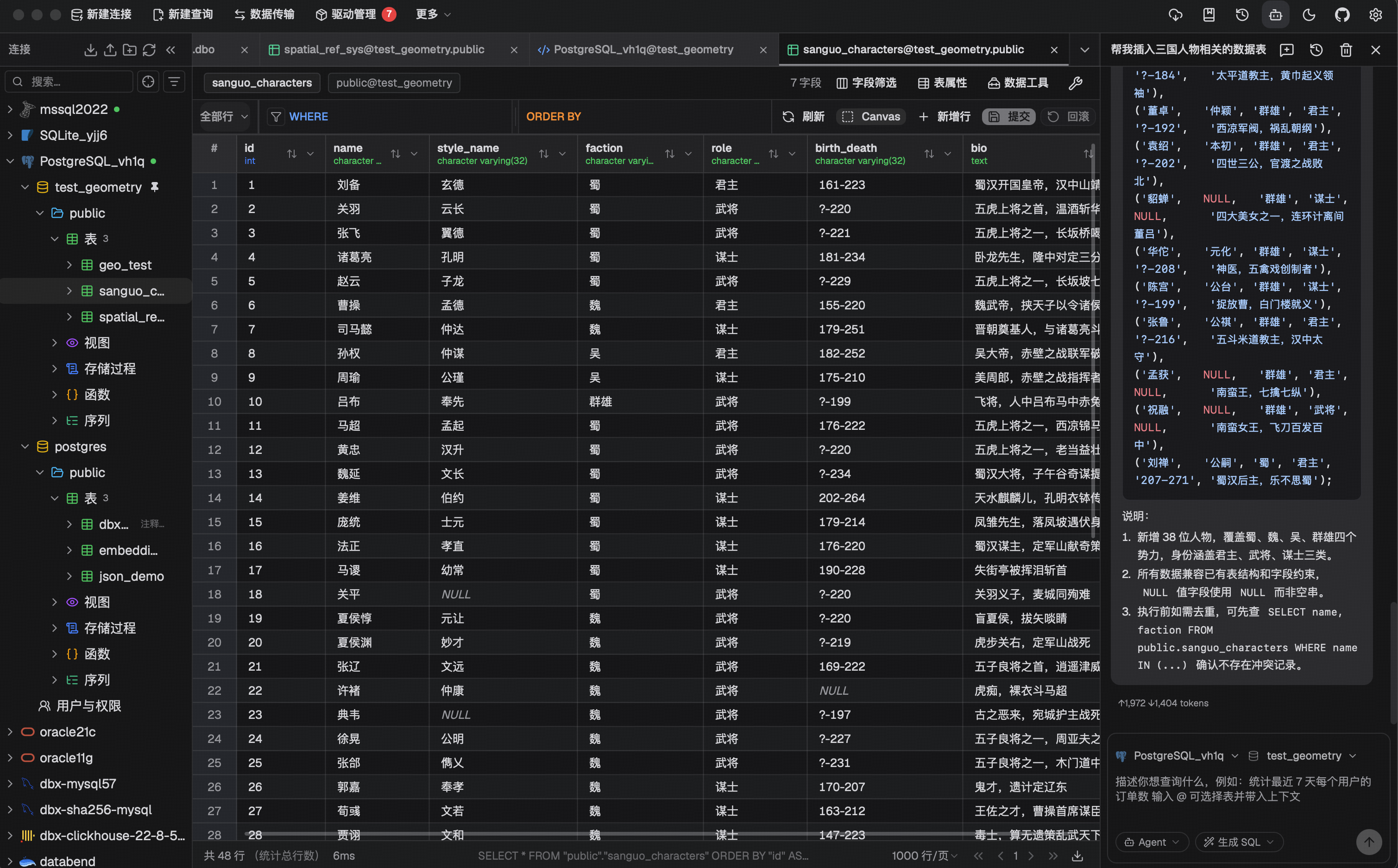
Anyone who has installed DBeaver probably remembers that Java runtime. TablePlus is nice but costs money, and let's not even get into Navicat. DBX takes a different approach: a database client built with Rust + Tauri, with an installer around 25 MB, no Java, no Chromium, and support for over 100 database types in one app. Today it hit GitHub Trending, gaining over 400 stars in a single day and passing 20,000 total stars.
Updates have been frequent lately, with v0.6.27 released just yesterday. The developer is based in China, so support for Chinese databases such as Dameng, Kingbase, openGauss, GaussDB, and OceanBase is particularly comprehensive. The interface also supports Simplified Chinese.
What it can connect to
The usual MySQL, PostgreSQL, SQLite, Redis, MongoDB, ClickHouse, SQL Server, Oracle, DuckDB, and Elasticsearch are all covered, along with Cloudflare D1, TiDB, Doris, StarRocks, CockroachDB, and InfluxDB. H2, Snowflake, Hive, Neo4j, Cassandra, and BigQuery connect through an agent, and you can configure custom JDBC connections too.
What's interesting is that it doesn't just manage databases. Kafka, RocketMQ, RabbitMQ, Pulsar, and MQTT, as well as Nacos, Consul, ZooKeeper, and etcd, have dedicated consoles for inspecting topics, messages, and KV configuration. The three or four tools you'd normally open while developing a project can all fit into one window here.
What's available for everyday use
- Query editor: CodeMirror 6, with metadata-aware completion, formatting, query history, and saved snippets
- Data grid: Virtual scrolling keeps large result sets responsive; edit cells directly and preview the generated SQL before saving; export to CSV, JSON, Markdown, XLSX, or INSERT statements
- Schema tools: ER diagrams, schema comparison (Schema diff), execution plans, column lineage, and table schema editing
- Data operations: CSV / Excel import, cross-database data migration, full database export, and data comparison; drag in Parquet, CSV, or JSON files to preview them directly (powered by DuckDB)
- Connections: SSH tunnels, proxies, automatic reconnection, confirmation prompts for dangerous operations, and connection configuration imports from DBeaver and Navicat
- AI assistant: Generate SQL from natural-language requests, or explain, optimize, and fix SQL. Supports Claude, OpenAI, Ollama, or any OpenAI-compatible API; generated SQL goes through a safety check before execution
Most useful for Claude Code users: MCP and CLI
DBX provides a separate MCP Server written in Rust, letting agents such as Claude Code, Cursor, and Windsurf query databases using connections you've already configured in DBX. They can list connections, inspect table schemas, execute SQL, and even open a specific table directly in the DBX interface.
Just add this to .mcp.json:
{
  "mcpServers": {
    "dbx": { "command": "npx", "args": ["-y", "@dbx-app/mcp-server"] }
  }
}
You don't need to put permissions in the configuration file. Manage them on the MCP page in DBX settings: restrict which connections an agent can access, then choose from three levels—read-only, data read/write, or full access. Before letting an agent query a production database, I'd recommend setting this to read-only.
If you'd rather have your agent use the command line, there's a CLI too:
npm install -g @dbx-app/cli
dbx agent setup
dbx connections list --json
dbx query local "select 1" --json
dbx agent setup installs the official Agent Skill to ~/.agents/skills/dbx, so agents that support skills know how to use it safely.
How to install it
Download the desktop app from the Releases page, or use a package manager:
macOS:
brew install --cask dbx
Windows (choose either Scoop or WinGet):
scoop bucket add dbx https://github.com/t8y2/scoop-bucket
scoop install dbx
winget install t8y2.dbx
For shared team use, you can self-host the Web version with one Docker command:
docker run -d --pull=always --name dbx -p 4224:4224 \
  -v dbx-data:/app/data \
  t8y2/dbx:latest
If image pulls are slow in China, you can use docker.cnb.cool/dbxio.com/dbx:latest instead. MCP can also point to the Web backend. Set DBX_WEB_PASSWORD if you need a login password.
Who it's for, and what to watch out for
It's a good fit if you work with a wide range of databases and don't want to install a pile of heavyweight clients, especially if you use both Chinese and mainstream databases. It also suits anyone who wants AI agents to query databases safely. Its plugin system (S3, Kubernetes, LDAP, and more) lets you extend it as needed.
A few things to keep in mind: the project was only created in April 2026, development is moving fast, and the version number is still at 0.6.x, so try it as a supplementary tool first for critical production work; always set a login password when exposing the Web version publicly; start agents with read-only MCP permissions and expand access as needed.
Project information
- Language: Rust (Tauri) + Vue
- License: Apache-2.0
- Star: approximately 21,600 as of 2026-09-29
- Latest version: v0.6.27 (2026-09-28)
- GitHub:https://github.com/t8y2/dbx
- Website: https://dbxio.com
Originally published on the SunAI forum. Versions, star counts, and relative dates in this article reflect the time the original post was published.
Last updated 2026-10-09
Comments 0