
llmfit: Find Out Which Local LLMs Your Computer Can Run with One Command
This post was translated from Chinese by AI. If anything reads oddly, the Chinese original is authoritative. 中文原文
If you've tried running large language models locally, you've probably hit the same wall: you find a model you like, download a dozen or so GB, then run out of VRAM when loading it—or barely get it running at two or three tokens per second. llmfit aims to help you make that call before downloading: it reads your hardware specs and tells you which models you can run and roughly how fast they'll be. It has climbed the Rust trending list over the past couple of days.
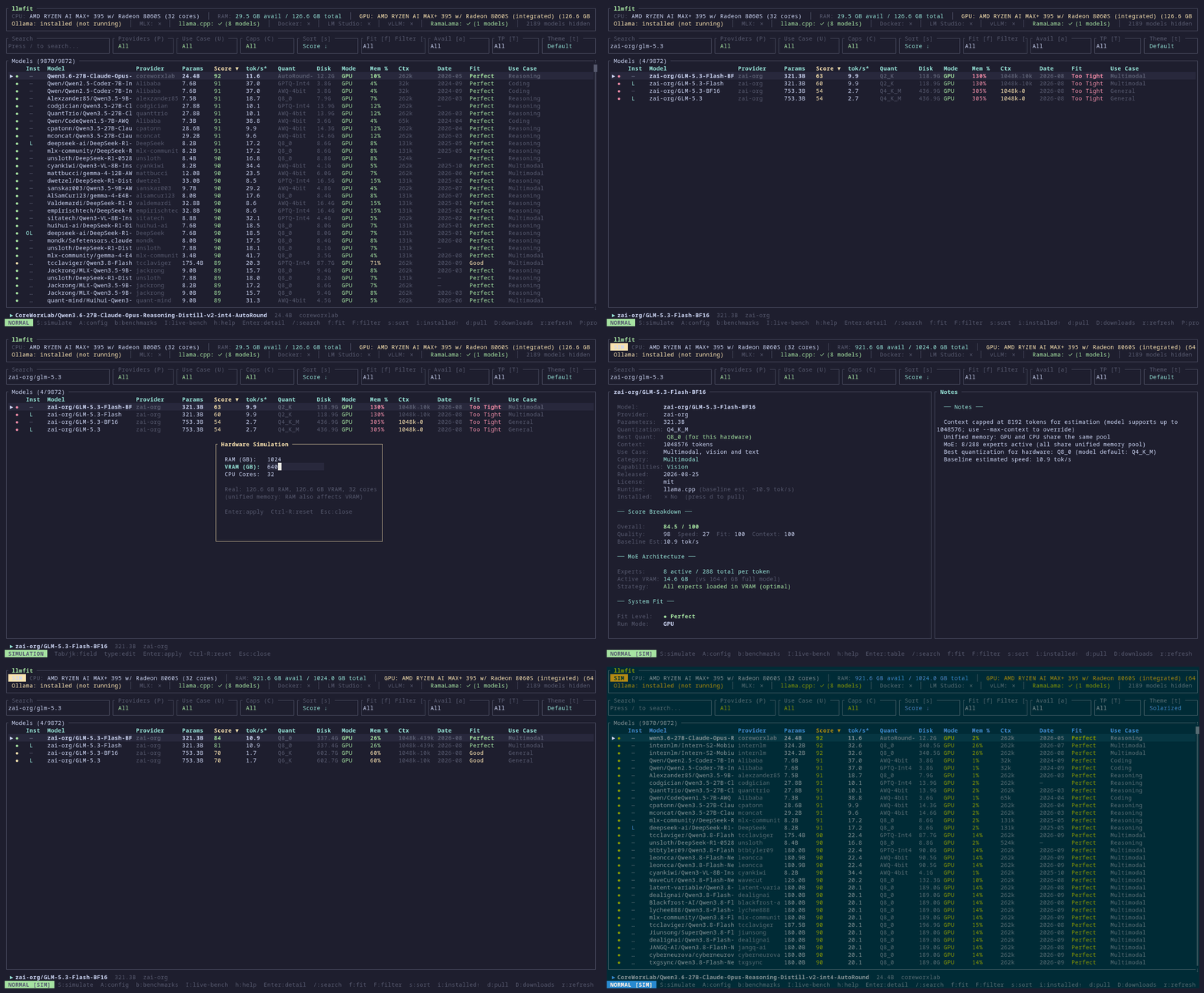
What it solves
llmfit is a terminal tool. On startup, it detects your CPU core count, RAM, discrete/integrated GPUs, VRAM, and unified memory architectures such as Apple Silicon (supporting NVIDIA CUDA, AMD ROCm, Intel OneAPI, and Apple Silicon). It then scores each model in its built-in catalog across four dimensions: whether it fits in memory, estimated speed, quality, and context length. Results are ranked by fit, so you don't have to calculate "how much VRAM a 7B model at Q4 needs" yourself.
A few features I find useful:
- Accounts for quantization formats (GGUF, AWQ, GPTQ, EXL2), showing memory usage and speed for different quantizations of the same model
- Recognizes MoE models and estimates speed based on active parameters rather than total parameters, making it more reliable than many "VRAM calculators"
- Supports multiple GPUs
- Bases speed estimates on a memory bandwidth model; you can inspect the assumptions behind each number with
llmfit info - Integrates with local runtimes such as Ollama, llama.cpp, MLX, Docker Model Runner, and LM Studio
- Also includes a Web dashboard and REST endpoints (
/api/v1/system,/api/v1/models) that scripts and agents can call directly
The recently added benchmark feature is interesting too: you can download a model locally, start a service, and measure actual tok/s. The results replace the estimates in the table, and you can submit a PR directly from the TUI to contribute them to the community. Others with the same hardware will then see real measurements.
How to use it
There are plenty of installation options:
scoop install llmfit

brew install AlexsJones/llmfit/llmfit

uv tool install -U llmfit
uvx llmfit        # Run directly without installing
Common commands:
llmfit                       # Interactive TUI: your hardware + all models, ranked by fit
llmfit fit                   # Classic table output
llmfit recommend --json      # Output recommendations as JSON for scripts/agents
llmfit info "<模型名>"        # Fit analysis and estimation assumptions for a single model
llmfit bench                 # Measure tok/s and time to first token on a running service
llmfit serve --port 8787     # Start the Web interface and API
In the TUI, / filters by name, family, or quantization, and h shows help. Machines without a GPU work too—it will make recommendations based on your CPU and RAM.
You can also run it as a persistent dashboard on a server. An official Docker image is available:
docker run -d -p 8787:8787 ghcr.io/alexsjones/llmfit serve
Who it's for, and what to watch out for
It's useful if you're choosing a local model or planning which model each machine in a fleet should run. Combine recommend --json with jq, and you can make it a step in your deployment workflow.
Keep in mind that, until you run a benchmark, the speed figures are estimates, not measurements. The README also notes that a similar tool, llm-checker, takes the approach of "actually running the model through Ollama." That gets closer to real-world performance but requires installing Ollama first. llmfit estimates from hardware specs upfront, trading accuracy for convenience. You can use both: shortlist models with llmfit, then benchmark the finalists.
Project details
- Language: Rust
- License:MIT
- Star: approximately 3.7 tens of thousands as of 2026-10-01
- Latest version: v1.1.16(2026-09-19)
- GitHub:https://github.com/AlexsJones/llmfit
Originally published on the SunAI forum. Versions, star counts, and relative dates in this article reflect the time of the original post.
Last updated 2026-10-09
Comments 0